
Guides
How to Manage Merchants in BankFlow
How automatic merchant recognition works, what the Rules and Spend/Income columns mean, and when to add a merchant manually.
Last verified in BankFlow on August 20, 2026.
Last verified in BankFlow on August 20, 2026.
What Merchant Recognition Does
Bank statements rarely say "Whole Foods", they say something like "WHOLEFDS MKT 10234 AUSTIN TX". BankFlow automatically matches raw statement text like that to a clean merchant identity, so your transaction list and reports read "Whole Foods Market" instead of the original noise. This runs by default; there's an "Identify merchants automatically" toggle in Settings if you'd rather turn it off.
Reading the Merchant List
Go to Merchants in the sidebar. Each row shows Rules (manual matching rules you've added for that merchant, separate from automatic recognition), Transactions (how many matched), Avg / visit, and Spend / Income.
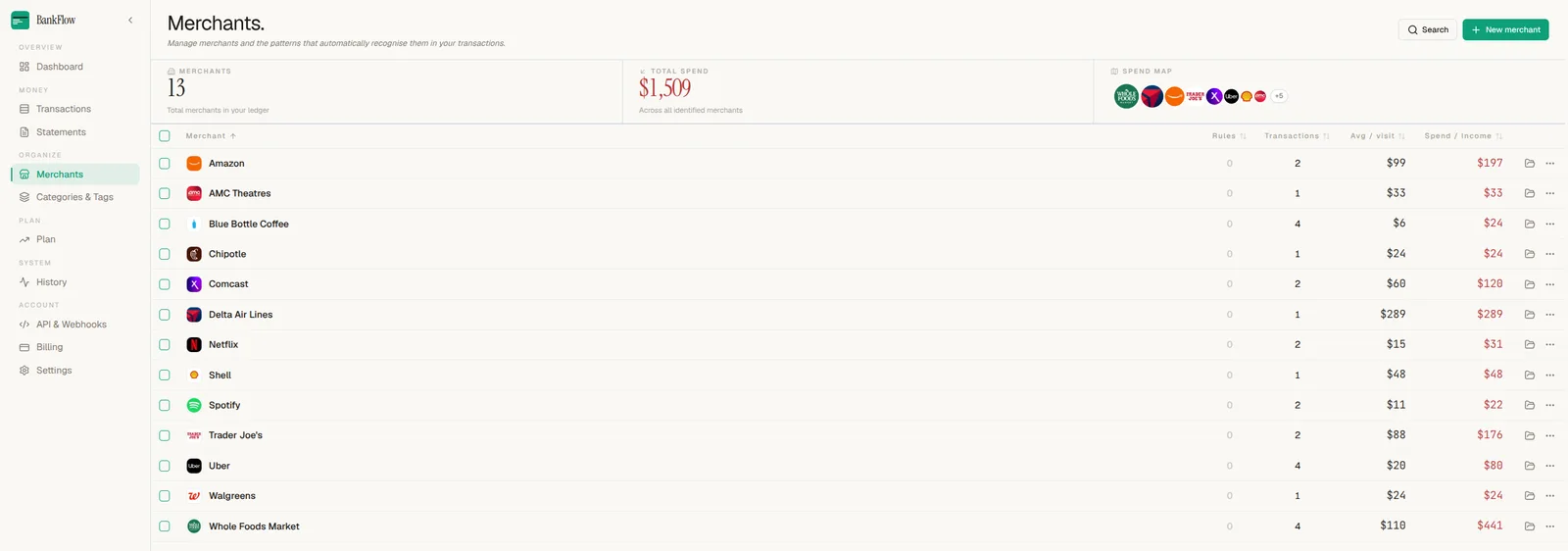
A Rules count of 0 across the board, as in the example above, means every merchant was identified automatically; nobody had to teach BankFlow what "WHOLEFDS MKT" means. You'd only see a nonzero count where automatic matching needed a manual assist.
The Spend Map Preview
The Spend Map tile in the header row shows icons for your top merchants and links to the same interactive map covered in the categories and spend map guide, just filtered to the merchant view instead of category.
Turning Off Auto-Recognition
If you'd rather name and categorize merchants entirely yourself, open Settings and turn off "Identify merchants automatically." New imports will then leave raw statement descriptions alone instead of resolving them automatically.
Adding a Merchant Manually
+ New merchant, top right of the Merchants page, covers cases automatic recognition misses, an uncommon local business or an unusually formatted statement line. We'll cover that flow, and rule creation, in a dedicated guide once we've captured it end to end.
Next Step
See how the categories those merchants roll up into work in how to organize categories, tags, and read the spend map.